

AI directly in your Outlook inbox
Summarize emails, analyze attachments, leverage internal knowledge, and draft responses.
Understand emails faster. Use knowledge directly. Prepare responses more efficiently.
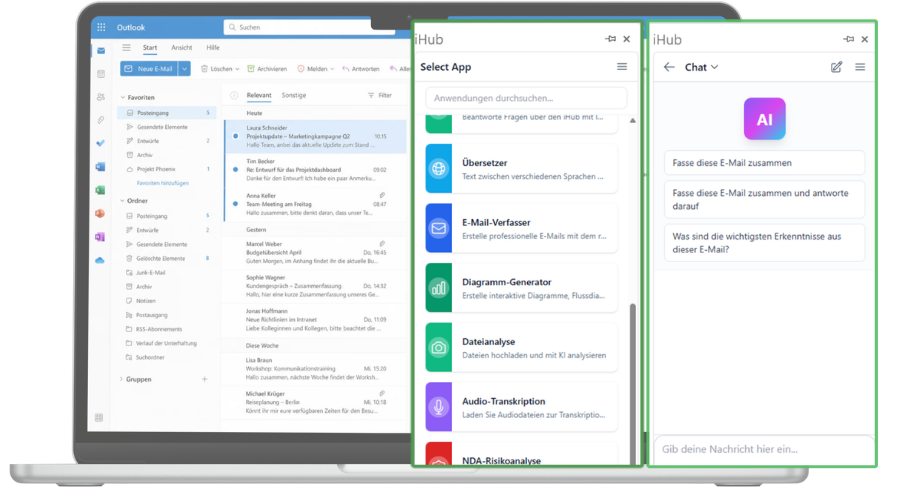
With the IntraFind Outlook add-in, your employees can use AI right where a large part of their daily communication takes place: in Microsoft Outlook.
Summarize long email threads, analyze attachments, ask questions about content, or incorporate information from internal company sources – without leaving Outlook.
This turns an email into a well-informed response more quickly.
Spend less time searching, reading, and summarizing

Complete and accurate search results
The add-in can:
- summarize individual emails and entire conversations
- identify key statements, questions, and tasks
- analyze attachments directly in Outlook
- answer questions about emails and documents
- incorporate relevant internal information
- create professional response drafts
Results can be reviewed, edited, sent, or forwarded directly in Outlook




It’s that simple

Open an email or attachment
Users stay within their familiar Outlook environment.

Open the add-in and select an AI function
Content can, for example, be summarized, analyzed, or used to prepare a response.

Use the result right away
Summaries, information, and response drafts are immediately available in Outlook.
Less searching. Less switching. Faster responses.
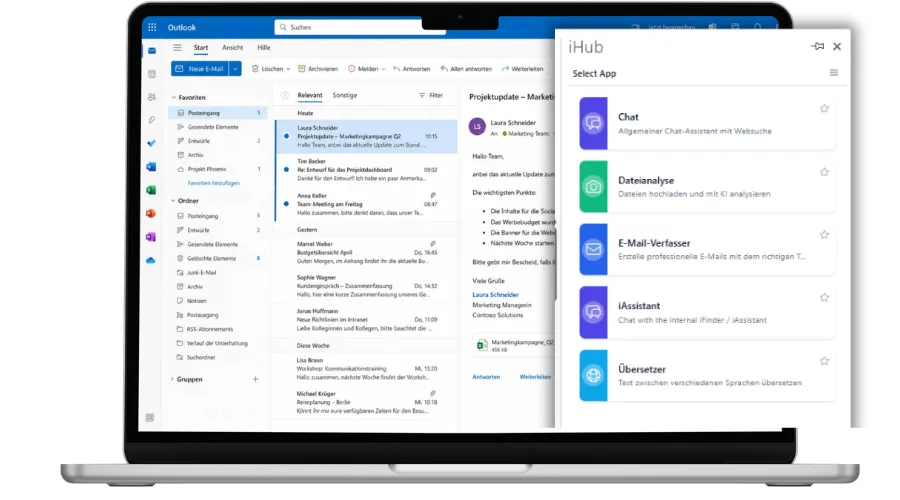
The Outlook add-in makes the difference
- The IntraFind Outlook add-in brings the AI capabilities of our product suite directly into your employees’ daily workflow.
- Your employees can understand information faster, handle requests more efficiently, and continue working directly with the results.


