Image
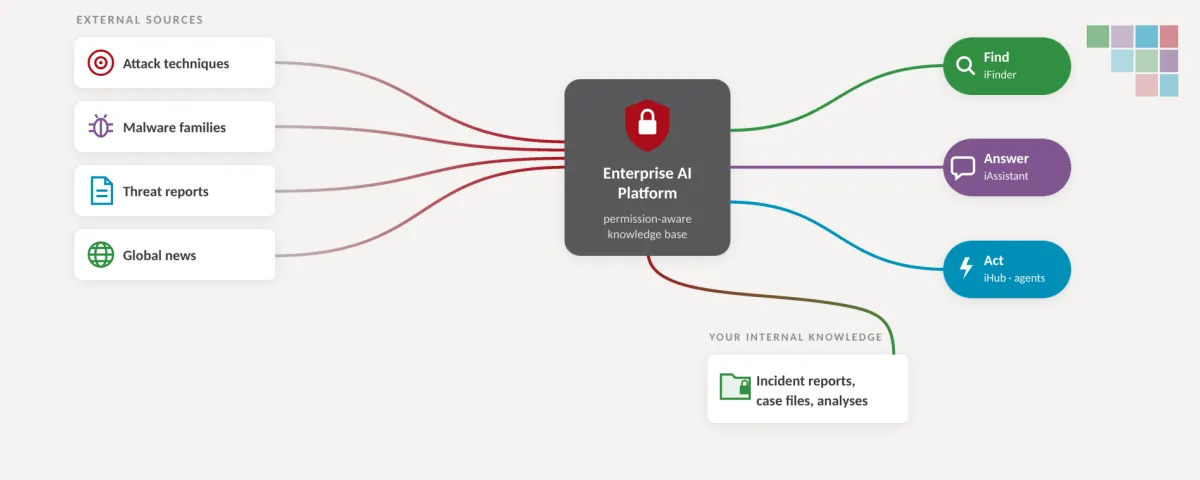
External sources (attack techniques, malware families, threat reports, global news) and internal knowledge flow into the Enterprise AI Platform, a permission-aware knowledge base – find with iFinder, answer with iAssistant, act with iHub

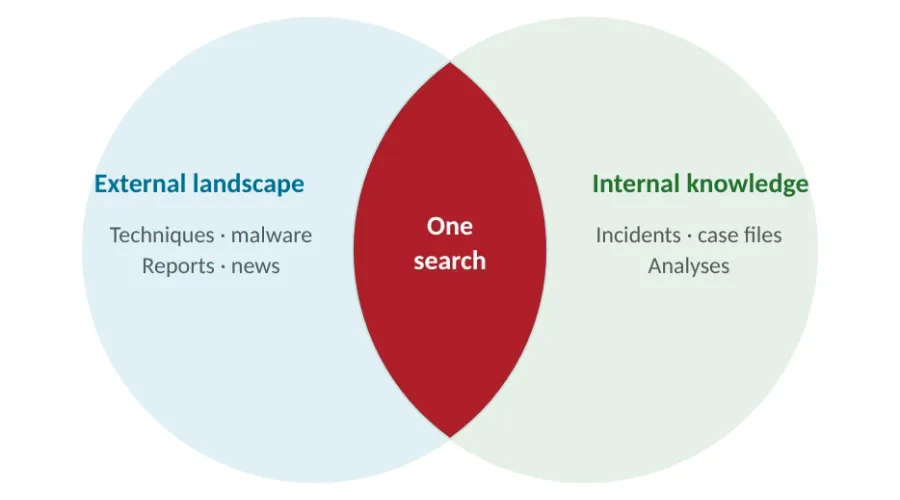
External threat landscape and internal knowledge in one search

OSINT & Cyber Threat Intelligence

Search, analyse and link attack techniques, malware families, threat reports and global news together with your incident reports and case files – with iFinder, iAssistant and iHub on IntraFind's Enterprise AI Platform. Permission-aware, with source citations and operated under your control, down to isolated networks if required.
Discuss your use case
iFinder Enterprise Search One Search

Two worlds, one search

Detecting cyber threats, monitoring international developments, assessing complex situations: security organisations need their own knowledge from incident reports, investigation files and analyses – and external sources on attackers, techniques and events. In most cases these worlds sit in separate databases, portals and information services.

IntraFind's Enterprise AI Platform connects open and commercial threat and situational sources to the same knowledge base as your internal content. With iFinder, iAssistant and iHub, this becomes one search across both worlds – with your access rights and a source citation for every statement.

Find. Answer. Act.

Find · iFinder

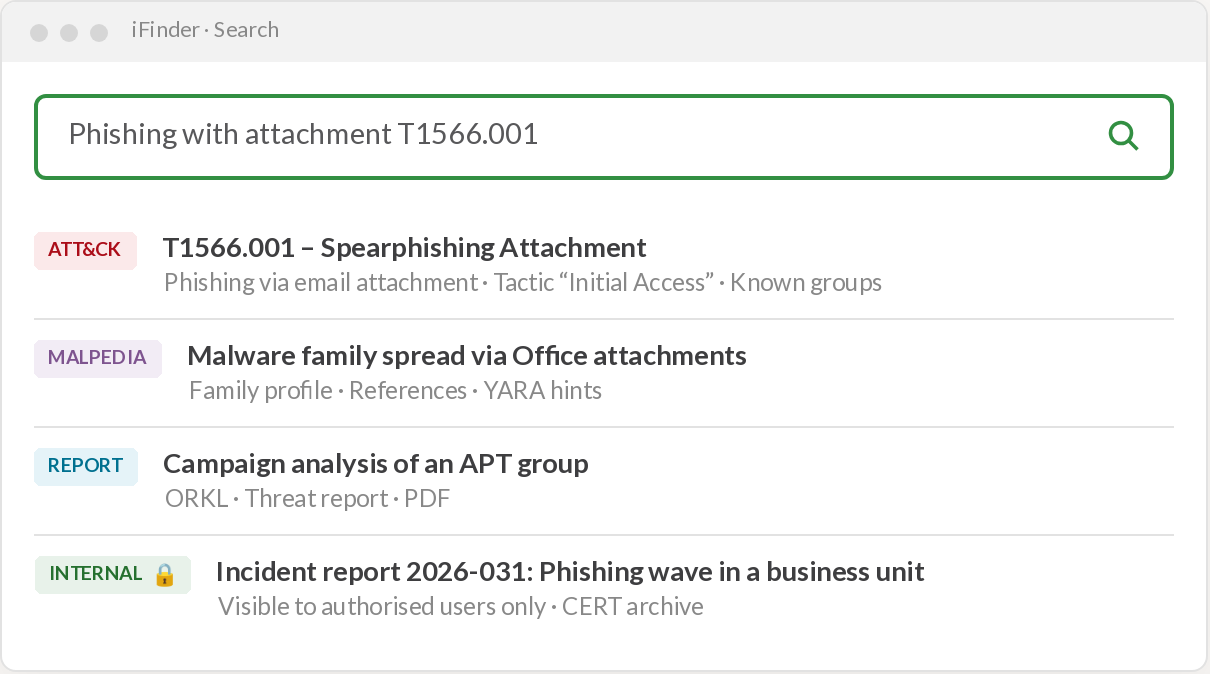
One search box for ATT&CK techniques, malware families, threat reports, news and your internal content – by wording and by meaning, thanks to semantic search and linguistics.
Answer · iAssistant

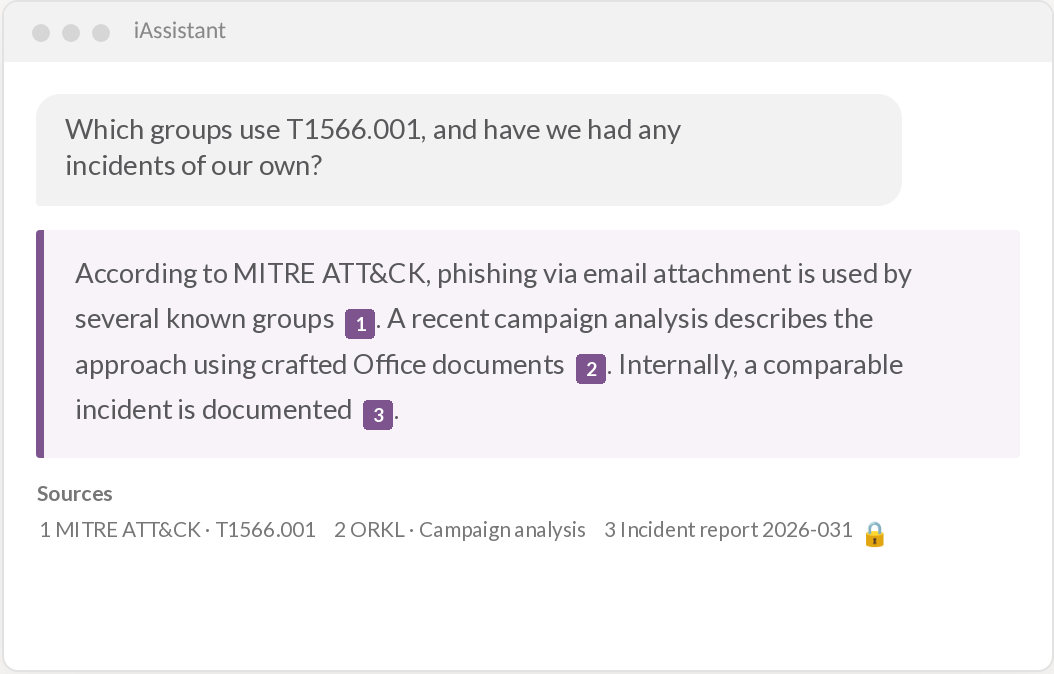
iAssistant answers questions from all connected sources and summarises them – with citations down to the passage. Internal content is only visible to those who are allowed to see it.

Act · iHub

Assistants and agents prepare overviews and profiles; STIX 2 passes threat data to your CTI tools. Via MCP and APIs, your own assistants can use the knowledge base as well.


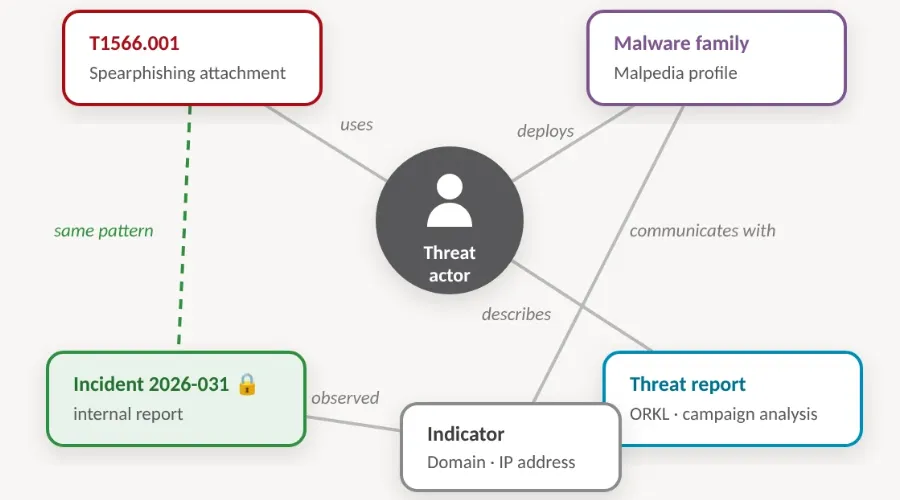
T1566.001 is the MITRE ATT&CK ID for phishing via email attachment – one of the most common initial access techniques in cyber attacks. Example view with fictitious internal data.
From individual pieces of information to sound insights

From individual pieces of information to sound insights

Index and graph

A relevant piece of information may sit in an internal incident report, a cybersecurity database or an international event report. Only together do they form a picture.

The platform indexes the connected sources for full-text and semantic search. In addition, it links the data in a graph database: how threat actors, attack techniques, malware families, technical indicators and your own incidents are related becomes visible – for research, for cited answers and for agents.

  • Index: Finds content by wording and by meaning – across all sources.
  • Graph: Shows relationships between actors, techniques, malware, indicators and incidents.

External sources & internal content → index and graph → iFinder · iAssistant · iHub → situational assessment & analysis

Access rights apply equally in the index and in the graph.
Typical use cases for OSINT & Threat Intelligence

Cyber threat intelligence

Cyber threat intelligence: understanding threats better

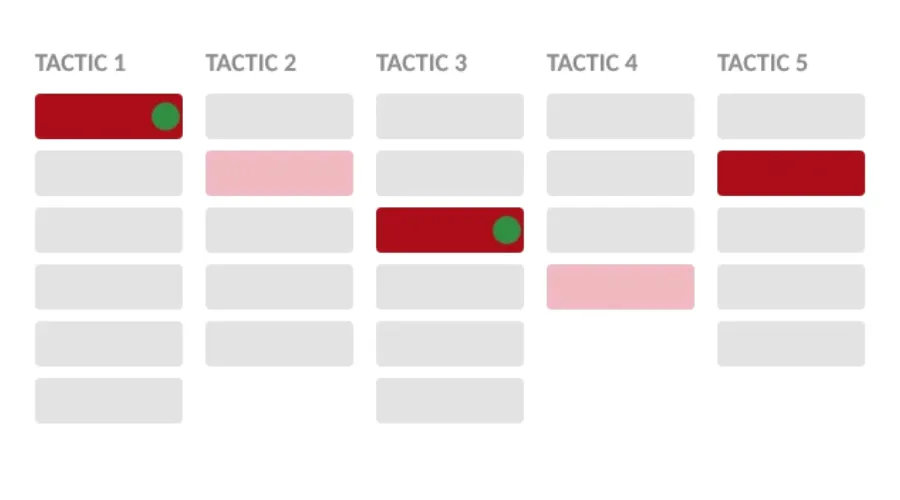
To assess attacks, security analysts need knowledge about attack techniques, malware families, threat actors and technical indicators. MITRE ATT&CK, Malpedia and threat reports are available right next to your own incident reports.

Typical tasks

  • Classify attack techniques and threat patterns
  • Research malware families and threat actors
  • Compare your own incidents with external knowledge
  • Prepare expert assessments and investigations

Suitable for: SOC, CERT, cyber defence and IT security departments
Geopolitical monitoring

Geopolitical monitoring: keeping track of international developments

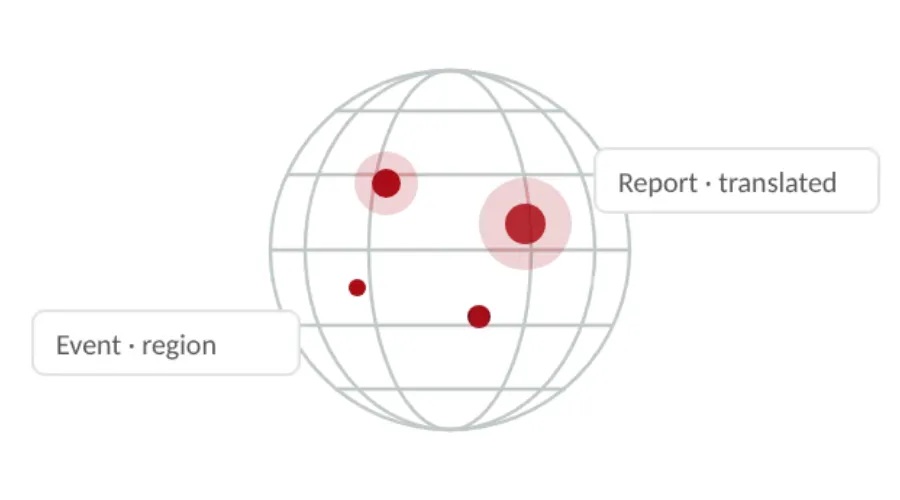
Crises, conflicts and security-relevant events evolve quickly. Global news from GDELT – machine-translated and sorted by time and place – and geolocated event information from Liveuamap complement your situational picture for regions and topics.

Typical tasks

  • Research international news and events
  • Monitor developments in regions
  • Complement existing situational pictures
  • Prepare analyses and assessments

Suitable for: Situation centres, security organisations, public authorities and organisations in the defence sector
Investigation support bringing leads together

Investigation support: bringing leads together

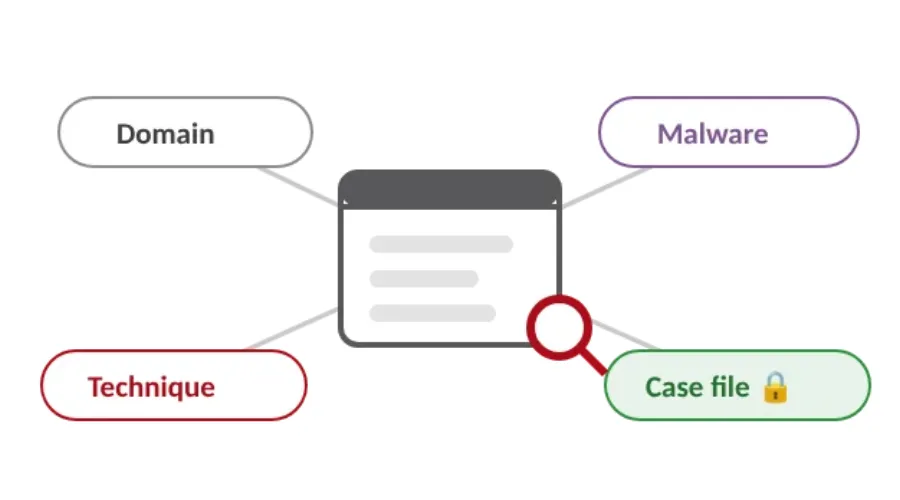
In complex investigations, information is spread across different repositories and tools. Lawfully usable external sources complement your internal information – and the graph shows how indicators, malware, techniques and incidents are connected.

Typical tasks

  • Research security-relevant matters
  • Complement internal information with external sources
  • Classify technical indicators and known patterns
  • Support structured research and analysis workflows

Suitable for: Police, law enforcement agencies, specialised analysis units and organisations with special security tasks
 

Sources we have already connected

The connectors open up different areas of information: from international events and attack techniques to malware analyses and technical threat indicators.
Open sources and standards (6)– click to expand
  • MITRE ATT&CK
    Internationally established knowledge base on adversary tactics and techniques.
    Typical use: Classify attack techniques and threat patterns
    attack.mitre.org
  • Malpedia
    Expert information on malware families, operated by Fraunhofer FKIE. Full access with your own account.
    Typical use: Malware research and CTI analysis
    malpedia.caad.fkie.fraunhofer.de
  • ORKL
    Community-run library of cyber threat reports.
    Typical use: Research and evaluate threat intelligence reports
    orkl.eu
  • CIRCL
    Services and information from the Computer Incident Response Center Luxembourg.
    Typical use: Supplementary technical security research
    www.circl.lu
  • GDELT
    Global news and events, machine-translated and sorted by time and place.
    Typical use: Event research and geopolitical monitoring
    www.gdeltproject.org
  • STIX 2
    Open standard for describing and exchanging threat information.
    Typical use: Import, export and exchange with CTI tools
    oasis-open.github.io/cti-documentation
Commercial services – with your licence (5)– click to expand
  • Google Threat Intelligence Your licence
    Including VirusTotal and Mandiant: investigation of suspicious files, domains, IP addresses and other indicators, analyses of actors and campaigns.
    Typical use: Classify technical threat indicators
  • Microsoft Threat Intelligence Your licence
    Threat information from Microsoft security research via the Microsoft Graph API.
    Typical use: Research actors and attack infrastructure
  • CrowdStrike Your licence
    Cyber threat intelligence via the CrowdStrike interfaces.
    Typical use: Supplementary CTI research
  • ESET Threat Intelligence Your licence
    Threat intelligence data and reports on APT activity.
    Typical use: Research on cyber threats and APT groups
  • Liveuamap Your licence
    Geolocated information on regional developments, conflicts and other events.
    Typical use: Regional monitoring and event research
Network and indicator enrichment (2)– click to expand
  • Cloudflare
    DNS and WHOIS lookups via the Cloudflare interfaces.
    Typical use: Technical classification of domains and networks
  • Further enrichment services
    IP, DNS and WHOIS information, geolocation and reputation services for indicators – for environments with controlled internet access.
    Typical use: Technical investigation of suspicious IP addresses and domains

Many years of project experience

The connectors were developed in a multi-year project in the security sector, where they are in productive use. We build your solution on this experience: as a customer-specific solution on the Enterprise AI Platform or as an extension of your existing iFinder with the sources listed – for in-depth situational assessment.

Together we define which sources you use, whether an index, a graph database or both are deployed, and which usage rights and licences of the providers apply. We also connect further sources and custom interfaces.

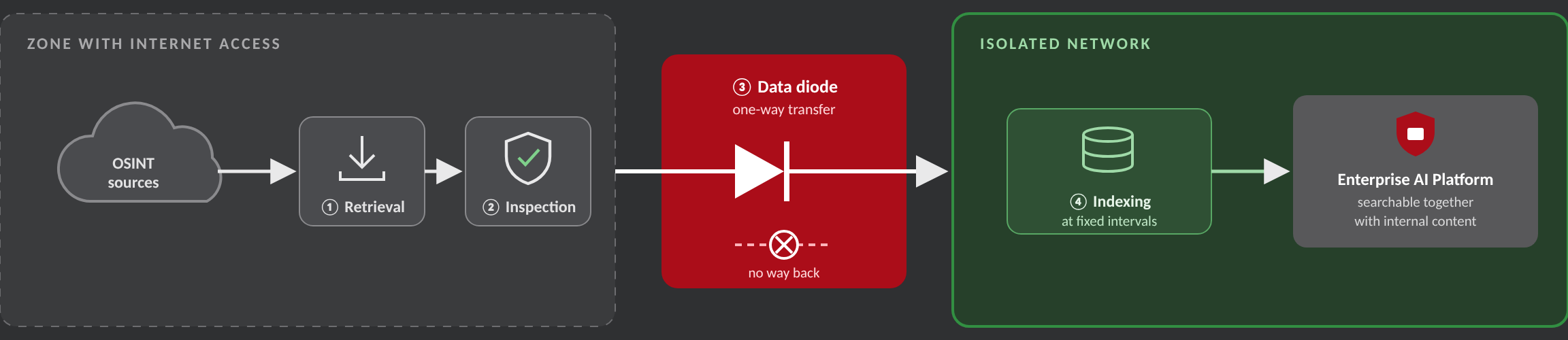
For isolated networks too – via a data diode

OSINT sources are on the internet. To make them searchable in a fully isolated network, they flow in under control and in one direction only.


  1. Retrieval: The platform retrieves the sources in an upstream zone with internet access.
  2. Inspection: Malware scan plus format and content checks before transfer.
  3. Data diode: One-way transfer, e.g. via a data diode – nothing flows back out of the isolated network.
  4. Indexing: Searchable together with internal content – at fixed intervals, not live.

Individual queries to external services, such as checking an IP address, are not possible in isolated operation – and deliberately so, as they would reveal what you are investigating.

Secure, sovereign, compliant

✔️ISO/IEC 27001 - IntraFind is certified to ISO/IEC 27001.

✔️EU AI Act - The Enterprise AI Platform complies with the AI Act (Regulation (EU) 2024/1689).

✔️Data protection - GDPR-compliant operation.

✔️No model training - Your data is not used to train AI models.

✔️Data residency - You decide where your data is processed and stored.

25 years of enterprise search experience · 80+ connectors and open interfaces · Software made in Germany

Frequently asked questions about OSINT & Threat Intelligence

OSINT stands for open source intelligence: the systematic collection and analysis of information from publicly accessible sources – such as news, public databases and technical information services. Publicly accessible does not always mean free of charge: some sources require an account or a licence.

Yes. The platform indexes external and internal sources together and, if required, also links them in a graph database. Internal content remains visible only to those who are allowed to see it.

iFinder combines full-text search with semantic search and linguistics. iAssistant generates source-based answers and summaries, and iHub provides assistants and agents for recurring tasks – across all connected sources.

Not for the open sources; full access to Malpedia requires your own account with Fraunhofer FKIE. You use commercial services such as Google Threat Intelligence or Microsoft Threat Intelligence with your own licence. We review the requirements together with you.

Yes, through a controlled import via a data diode at fixed intervals. Live queries of individual indicators to external services are not possible there.

Not when entire data sets are retrieved. For individual enrichment queries, the queried indicator is sent to the service – which is why you decide which queries are permitted.

Yes, via the open STIX 2 standard. Your own assistants and applications access the same permission-aware knowledge base via MCP and APIs.

Yes. With more than 80 connectors and open interfaces, we connect further sources and custom APIs. Which source can be connected and how is determined by your requirements and the usage rights.

No. Your data is not used to train AI models.


Which sources belong in your situational picture?

Would you like to integrate OSINT data, cyber threat intelligence or specialised information services into your research? Bring a use case – we will show you how it comes together on the platform.

Unlock knowledge. Enable insight.

Discuss your use case

I consent to the collection and processing of my data from the contact form for the purpose of answering my query.
Consent can be withdrawn at any time.

Detailed information can be found in our privacy policy.  

Product and company names mentioned are trademarks of their respective owners; they are named to describe which services can be connected. Use of the services requires a licence or access from the respective provider.